How to Analyze Your LinkedIn Profile Using ChatGPT (Step-by-Step Guide)
Optimizing a LinkedIn profile usually feels complicated.
You’re not sure:
- What’s working
- What’s unclear
- What’s actually stopping people from reaching out
The good news?
You can use ChatGPT to analyze your LinkedIn profile and get structured, actionable feedback - in minutes.
This guide walks you through exactly how to do it, step by step.
Why Use ChatGPT to Analyze Your LinkedIn Profile?
ChatGPT works well for profile analysis because it can:
- Read your full profile at once
- Spot clarity and positioning gaps
- Suggest improvements for headlines, About sections, and experience
- Evaluate your profile based on a specific goal
It’s not a replacement for expert review, but it’s a strong first-level diagnostic tool.
Step 1: Download Your LinkedIn Profile as a PDF
First, you need your LinkedIn profile in PDF format.
How to do it:
- Open your LinkedIn profile
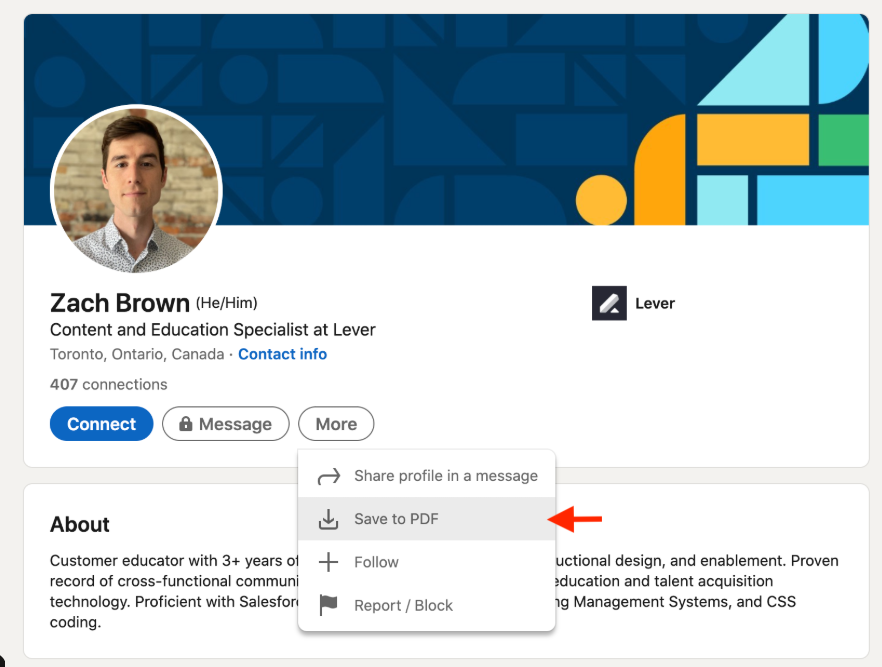
- Click the “More” button (usually under your headline)
- Select “Save to PDF”
This downloads a snapshot of your entire profile - headline, About section, experience, skills, and more.
Step 2: Open ChatGPT
Next, open ChatGPT in your browser.
Make sure you’re using a version that allows:
- File uploads (PDF)
- Longer responses
This ensures the analysis is detailed and usable.
Step 3: Upload Your LinkedIn Profile PDF
Inside ChatGPT:
- Click the attach / upload option (paperclip icon)
- Upload your LinkedIn profile PDF
- (Optional but recommended) Add a profile snapshot if you want feedback on visual layout or headline visibility
This gives ChatGPT full context of your profile.
Step 4: Use This Prompt to Analyze Your LinkedIn Profile
Copy and paste the prompt below after uploading the PDF.
🔹 ChatGPT LinkedIn Profile Analysis Prompt
Act as a LinkedIn profile optimization expert.
I have attached my LinkedIn profile as a PDF.
My goal on LinkedIn is:
[ADD YOUR GOAL HERE – e.g. generate inbound leads, get job opportunities, build authority, attract clients]
Please analyze my profile in detail and cover the following:
1. Headline:
- Is it clear who I help and what I do?
- What is missing or unclear?
- Suggest 2–3 improved headline options aligned with my goal.
2. About Section:
- Does it clearly address my target audience’s problem?
- Is my value proposition easy to understand within 30 seconds?
- Rewrite the About section with better clarity and structure.
3. Experience Section:
- Are my roles written as responsibilities or outcomes?
- What should be improved to build trust and authority?
- Suggest specific changes or examples.
4. Overall Positioning:
- Is my profile focused or too generic?
- What audience does my profile currently attract?
- What audience should it attract based on my goal?
5. Conversion:
- Is there a clear reason for someone to contact me?
- What call-to-action would work best for my goal?
Give me clear, actionable feedback and suggested rewrites where relevant.
👉 Important: Always add your goal.
Without a goal, the analysis will be generic and less useful.
Step 5: Review the Analysis Carefully
Once ChatGPT responds:
- Don’t apply everything blindly
- Look for patterns in the feedback
- Focus on clarity, not clever wording
Pay special attention to:
- Headline relevance
- About section structure
- Positioning consistency
If something feels unclear to you, it will definitely be unclear to profile visitors.
Step 6: Update Your LinkedIn Profile Based on the Feedback
Make changes directly on LinkedIn:
- Update headline first
- Rewrite the About section
- Improve experience descriptions
- Add a clear CTA if missing
After updating, give it a few days and observe:
- Profile views
- Connection requests
- Inbound messages
Even small improvements in clarity can lead to noticeable changes.
Common Mistakes to Avoid When Using ChatGPT
- Forgetting to add a clear goal
- Asking for “improvement” without context
- Making the profile sound robotic or generic
- Over-optimizing with buzzwords
- Ignoring your real audience
Use ChatGPT as a thinking partner, not a copy-paste machine.
Final Thoughts
Using ChatGPT to analyze your LinkedIn profile is a fast and effective way to:
- Identify clarity gaps
- Improve positioning
- Understand why your profile may not be converting
It won’t replace expert strategy, but it can help you move from guesswork to structure.
If your LinkedIn profile isn’t working today, start by analyzing it - before posting more content.
Need a Deeper Analysis?
If you want a deeper, goal-driven LinkedIn profile analysis beyond automated feedback, a structured expert review can help uncover blind spots faster.